Browse by what you do. Open any card for the full capabilities.
All feature topics
Dashboard
Dashboard
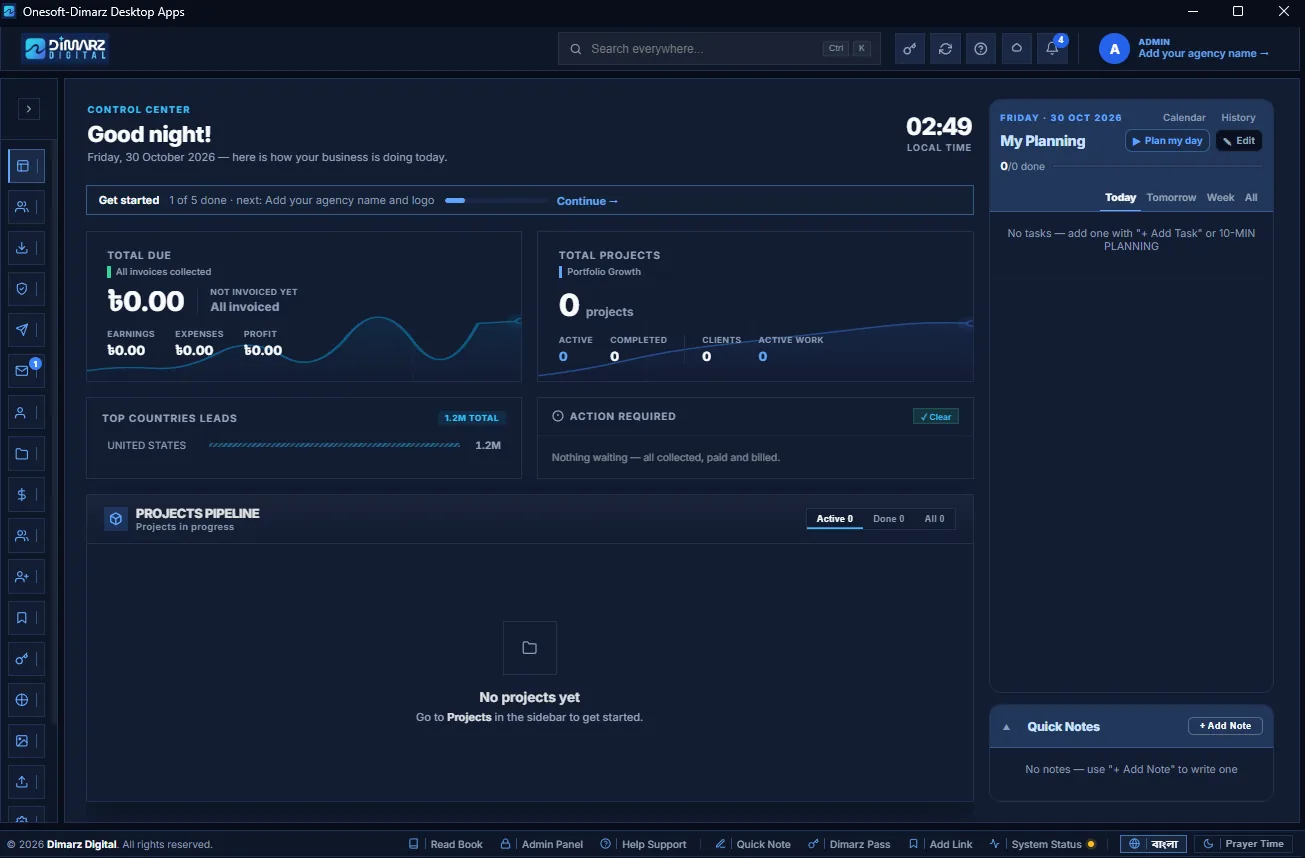
An instant pulse on client dues, project deadlines and urgent team actions, with your daily plan and notes in one view.
Financials cardPortfolio overviewLeads summary
Explore capabilities
Financials card — Total Due from unpaid invoices, Not invoiced yet (unbilled work), Earnings, Expenses, and Profit or Loss.
Portfolio overview — total projects, Active and Completed counts, Clients and Active Work.
Leads summary — Top Countries Leads with distribution bars.
Action Required — collect client balances, pay your team, bill the rest. Turns green with ✓ Clear when everything is done.
Projects Pipeline — projects in progress with deadline countdowns and payment progress; Active / Done / All tabs.
Automatic status — Overdue (past deadline), Due soon (within 7 days), On track, Done.
Daily planner — tasks for TODAY, TOMORROW and THIS WEEK with Urgent / High / Low / Optional priority. Unfinished tasks roll over to the next day automatically.
Quick Notes — memos with CRITICAL, IMPORTANT, MINOR or OPTIONAL badges, with archive history.
System diagnostics — live status of e-mail account, mail system, hiring form, Google Drive, app lock and cloud backup.
Find & win clients
Leads Database
The central home for your business contacts, companies and decision makers.
FiltersLead SummaryLead details
Explore capabilities
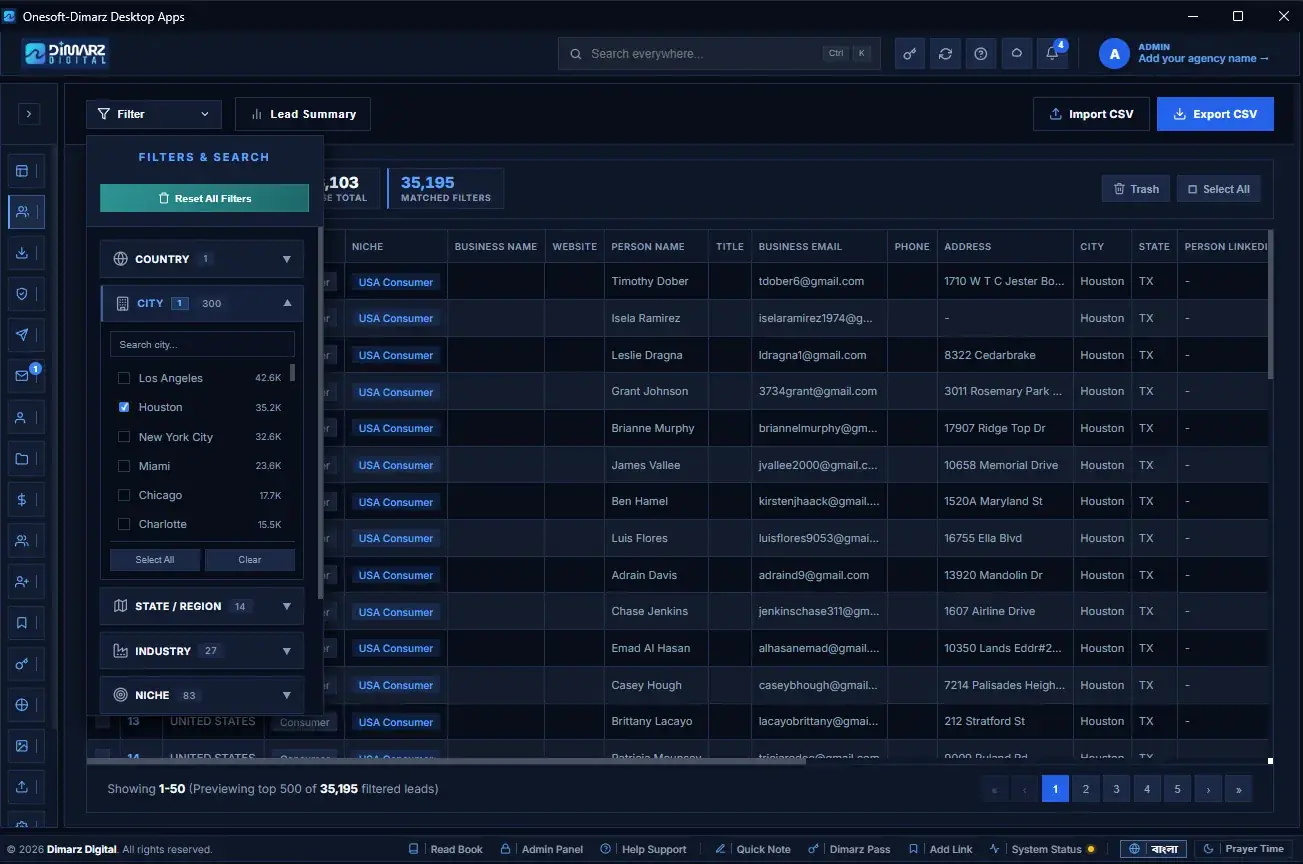
Filters — Country, City, State / Region, Industry, Niche, Company Size, Title and Generated By. Reset All Filters in one click.
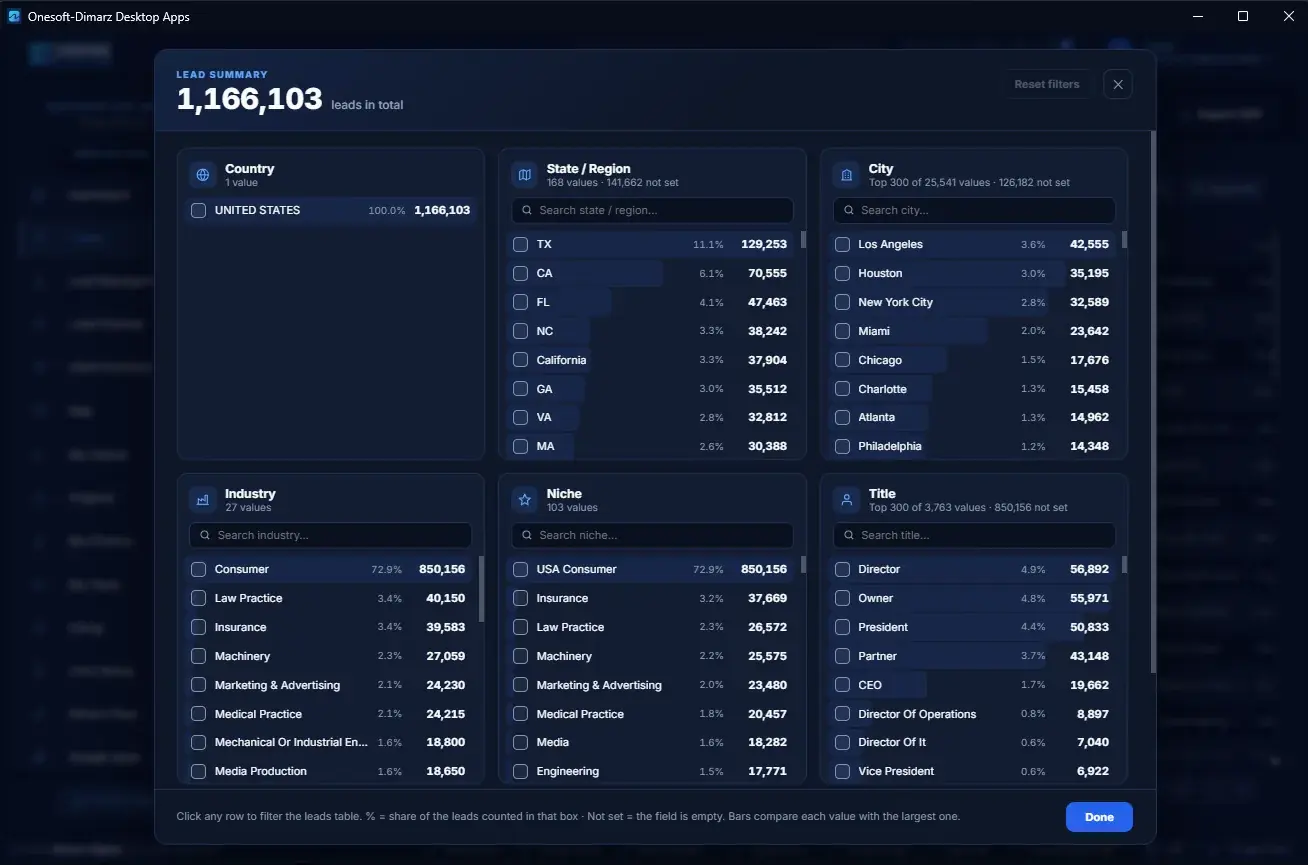
Lead Summary — visual charts with counts and percentages; click any bar to filter.
Lead details — Country, Industry, Niche, Business Name, Website, Person Name, Title, Business Email, Phone.
Export CSV — choose columns and how many leads to export.
Add to Prospects — send selected leads straight into Client Outreach, where e-mails are checked first.
Trash — deleted leads can be restored; delete forever only when you choose.
Fast with huge lists — stays smooth even with hundreds of thousands of leads.
Find & win clients
Lead Management (import)
Bring new contacts into the database — the validator flags duplicates and invalid e-mails before saving.
Direct Leads Import (CSV)Bulk Leads Import (CSV)Cloud Import
Explore capabilities
Direct Leads Import (CSV) — one file, with column mapping, syntax audit and duplicate check.
Bulk Leads Import (CSV) — scans a whole folder of CSV files and imports them in sequence.
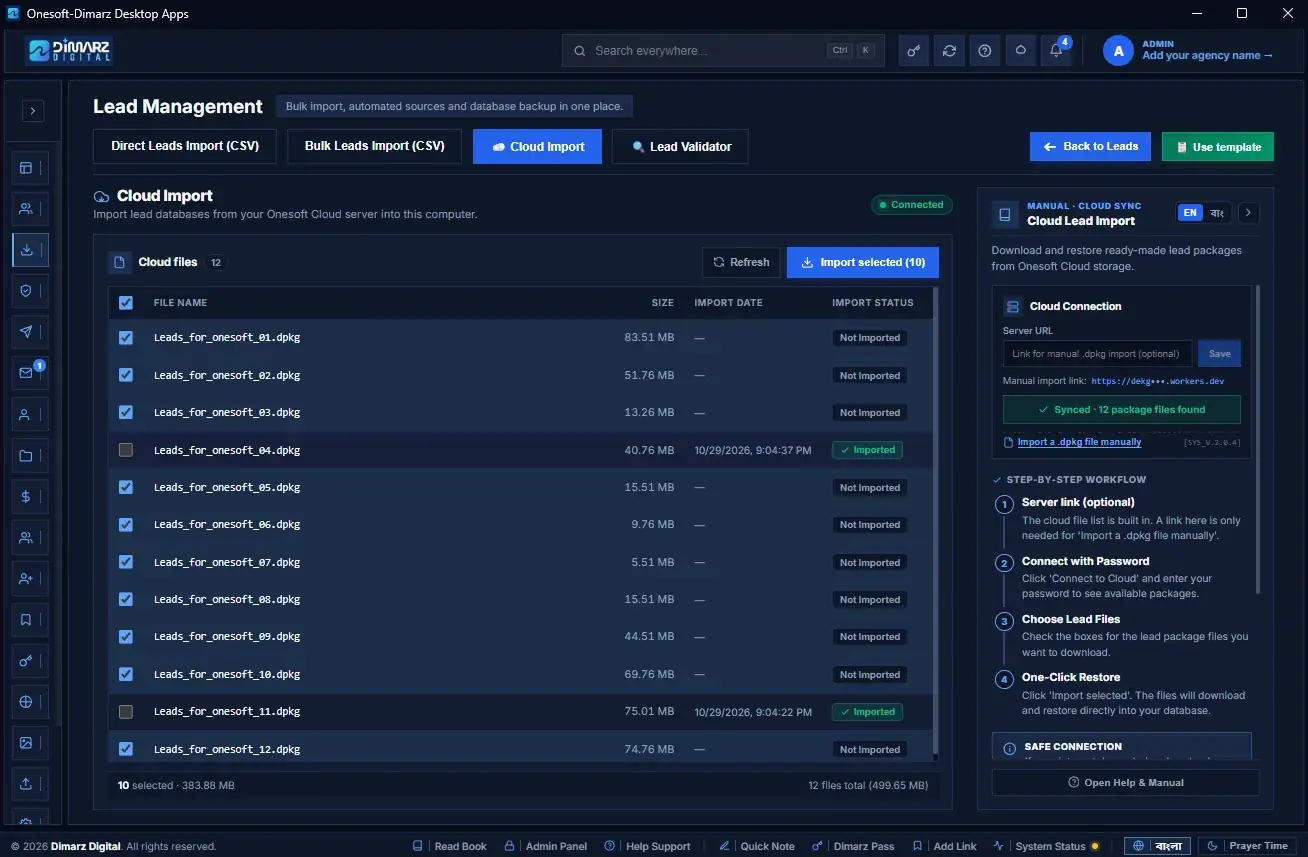
Cloud Import — download ready, pre-verified lead packages from the cloud (encrypted .dpkg packs).
Validation Audit Report — Total Rows, Valid / Safe, Hard Duplicates and Soft Warnings before you commit.
Automatic de-duplication — e-mails already in the database are skipped.
Lead Validator — scan existing leads and clean invalid records.
Safe downloads — if the internet drops, processing pauses and continues later.
CSV template — one click to get the correct column format.
Find & win clients
Lead Checker
Clean and verify a client's lead sheet before delivery — without touching your main database.
Upload up to 20,000 rowsStep 1 — Quick checkStep 2 — Mailbox check (optional)
Explore capabilities
Upload up to 20,000 rows at once.
Step 1 — Quick check: spelling/syntax, domain MX records and disposable e-mail, instantly.
Step 2 — Mailbox check (optional): checks mailbox availability with the mail server — no e-mail is sent.
Clear results: Safe to send · Send with care · Do not send · Free e-mail (Gmail, Yahoo, Outlook).
Three views: Filtered Leads, Original Leads, Removed Leads.
Safe limits: max mailbox checks per hour to protect your IP, parallel checks, allow and block lists.
Pause / Resume — and if the app closes, the job continues where it stopped.
EXPORT — download the final clean sheet, ready for the client.
Find & win clients
Client Outreach (e-mail campaigns)
Cold outreach and broadcast campaigns sent from your own verified mail accounts.
ProspectsBuilt-in checksStatus tabs
Explore capabilities
Prospects — import CSV, add from Leads, or add one by one; organise with lists and tags.
Built-in checks — Quick check (syntax, MX, throwaway domains) and Check mailboxes (deep check in the background).
Status tabs — Ready, In sequence, Replied, Do not contact, Bounced.
A/B testing — second subject line, sample size, test duration and winner rule.
Send now or schedule — pause, resume, cancel; campaigns survive app restarts.
Smart follow-ups — when a prospect replies, their sequence stops automatically.
Reply inbox — Interested, Meeting booked, Not interested, Out of office, Archived.
Consent first — opt-in confirmation required; suppressed contacts and past bounces are skipped automatically.
Workspace areas — Overview, Campaigns, Prospects, Calendar, Automations, Templates, Forms & pages, Reports, Deliverability (SPF/DKIM, warm-up, inbox placement), Integrations, Settings.
Find & win clients
Mail
Everyday business e-mail: write to clients and your team, send invoices, receipts and payslips, and answer replies.
Unlimited sender accountsToday viewDaily limits per account
Explore capabilities
Unlimited sender accounts — Gmail, Google Workspace, Zoho, Microsoft, Hostinger or your own server; provider detected automatically.
Today view — remaining daily sending capacity across all senders, sent today, last 7 days chart, bounces, do-not-email count, account health and new replies.
Daily limits per account — protects every account from spam filters; add more accounts to send more.
Signature per account.
Docked composer — stays open while you work; Cc / Bcc and Team quick-add.
Bangla phonetic typing — type in English letters, get Bangla with instant word suggestions.
Send separately — everyone gets their own copy; {{name}} inserts each person's first name.
Drafts saved automatically.
Inbox — Inbox, Unread, Sent, Archive, Not delivered, Interested and lead labels.
Reply, Reply all, Forward — Ctrl + Enter to send.
Labels — Interested, Meeting, Not now, Not interested, Unsubscribe (adds to do-not-email list).
Search — names, subjects and full text, in English or Bangla, even with small spelling mistakes.
Spam-folder replies are found and marked.
Clients & team
My Clients
Everyone you work with, with their projects, invoices and balance in one place.
Money cardsClient profileClient Financials Hub
Explore capabilities
Money cards — Total Clients, Total Invoiced, Total Payment Received, Total Due.
Client profile — name, e-mail, website, LinkedIn, country, address and source (Upwork, Fiverr, Direct Contact, Referral, LinkedIn).
Client Financials Hub — Total Value, Total Invoiced, Total Collected, Uninvoiced Left, collection progress bar and Current Balance Due, plus all associated projects.
Active / Inactive status tabs, search, sort and Export CSV.
Mail selected clients in one click.
Safe records — a client with projects can't be deleted by mistake; set them Inactive instead.
First project prompt right after adding a client.
Clients & team
Projects
One home for every client project — deadlines, progress, team, invoices and payments.
Live money summary while you createProject typesMulti-currency
Explore capabilities
Live money summary while you create — project value, team cost and estimated profit with a margin bar, updating as you type.
Project types — Lead Generation, Outreach, Ads, Web Development and more; target leads count for lead projects.
Multi-currency — BDT, USD, EUR, GBP…; enter the original value and agreed rate, the ৳ value is calculated automatically.
Status tabs — In Progress, Pending, Done, On Hold, Archived, with live counts.
Money cards — Total Value, Total Invoiced, Total Payment Received, Total Due.
Assign your team — per member deadline and rate (or per-lead rate).
Extra expenses — software or ad costs, optionally added to the client invoice.
Links & notes — working sheet URL, client delivery URL and client instructions.
Issue Invoice → Record Payment → receipt, each e-mailed with one click.
Client advance — payment before an invoice is kept and deducted from the next invoice automatically.
Automatic progress — moves with each milestone (started, invoiced, paid, team paid) and reaches 100% when marked Done.
Exchange gain/loss recorded when the bank amount differs.
E-mail the client or the team from inside the project — each member gets their own tasks, deadline and pay rate.
Money cards — Total Members, Total Assigned Earnings, Total Team Payment, Total Team Due.
Member profile — name, e-mail, phone, WhatsApp, LinkedIn, role and address.
Pay Now — appears when a member is owed; full or partial payment from any account.
Professional PDF payslips — e-mail them or share on WhatsApp.
Payslip Ledger — complete payment history per member.
Fair cost calculation — per-lead (leads × rate) for lead projects, flat fee for others.
Archive and restore members; members on running projects are protected from deletion.
Mail selected members, search, sort and Export CSV.
Clients & team
Hiring
Recruit team members through Google Forms — set up in one click.
Create a Hiring FormCustom title and job rolesShare the link
Explore capabilities
Create a Hiring Form in your own Google account with ready questions: name, e-mail, WhatsApp, phone, LinkedIn, position and address.
Custom title and job roles before creating.
Share the link on Facebook, WhatsApp or e-mail.
Sync Now — pulls every application into the app.
Spam protection — applicants sign in with Google, so their real e-mail is recorded.
Stop / Start taking applications — same link, any time.
Multiple forms for different roles.
Review — New / Reviewed stages, Mark Reviewed, Reject.
Hire in one click — the candidate goes straight into My Team.
Privacy — the app can only see the forms it creates itself.
Add Manual for offline applicants; advanced Apps Script option for your own form.
Money & documents
My Finance
All your money in one place: what clients paid and owe, what you spent and owe your team, the balance of each account, and profit.
OverviewIncomeExpenses
Explore capabilities
Overview — money in, money out and profit for This month, Last month, This year or All time, in ৳ BDT or $ USD.
Income — invoices, receipts and client dues per project.
Expenses — software, ads, office and more; team payouts and team owed.
Accounts — balance of every place your money is: Bank, Payoneer, Cash and more, with full transaction history.
One Add Transaction menu — payment received, send an invoice, add an expense, pay your team, move money between accounts, or other (capital, loans, adjustments).
Exchange rates — default rate per currency; each project keeps its own contract rate.
Write off bad debt without deleting history.
Reports — Profit & Loss, Balance Sheet, Capital & Loans.
For your accountant — Export CSV and Print PDF.
Money & documents
Invoices, receipts & payslips
Bill clients, record payments and send branded documents in seconds.
Invoice from any projectStatusesRecord Payment
Explore capabilities
Invoice from any project — amount, itemised lines, due date and notes; unique number assigned.
Statuses — Unpaid, Partially Paid, Overdue, Paid, Void, Written Off; overdue is marked automatically.
Record Payment — full or 50% presets, any account, actual bank amount for foreign currency.
Automatic receipts — payments clear the oldest invoices first; extra payment is kept as an advance.
Branded A4 PDF — your agency name, logo and contact details.
Send by e-mail (PDF attached) or WhatsApp (pre-written message with project breakdown).
Project Statements — contracted value, billed, paid and balance per project.
Team Payslips — every staff payment, partial payments and project cost allocation.
Foreign-currency invoices with ৳ accounting kept accurate.
Everyday tools
bdi4 Pass — password vault
Agency logins, client credentials, server keys and licences in an encrypted vault.
Strong encryption100% localCategories
Explore capabilities
Strong encryption — AES-GCM 256-bit, keys from PBKDF2-SHA-256 with 650,000 iterations.
System Audit Logs — security and maintenance events, kept locally.
Safety & system
Help & Manual
Full bilingual manual — English and Bangla, switch any time.
Full bilingual manualStep-by-step guidesSearch
Explore capabilities
Full bilingual manual — English and Bangla, switch any time.
Step-by-step guides for every module, with buttons that open the right page.
Search across all topics.
App Map — an interactive map of the whole app.
Troubleshooting — solutions for common issues.
No matching features
Try a different search or browse all categories.
Real screens from the app
See the real appbefore you buy.
Real screenshots from the app. Scroll to go through the pages you will use every day.
Every picture below is a real screenshot of the desktop app — not a mock-up.
DashboardReal screenshot
Dashboard 01 / 07
Your whole business on one screen
Earnings, invoices, projects and what needs action today — with a projects pipeline, your day's planning and quick notes.
Earnings
Projects pipeline
My Planning
Leads · FiltersReal screenshot
Leads · Filters 02 / 07
Find exactly the leads you need
Filter by country, city, state, industry and niche, see how many leads match, then export the list as CSV.
Country & city
Industry & niche
CSV export
Leads · SummaryReal screenshot
Leads · Summary 03 / 07
Your lead database at a glance
Lead counts by country, state, city, industry, niche and title. Click any row to filter the leads table.
Counts by field
Search each list
Click to filter
Lead Management · Cloud ImportReal screenshot
Lead Management · Cloud Import 04 / 07
Bring leads in, your way
Import CSV files one by one or in bulk, pull lead databases from your cloud server, and check lists with Lead Validator.
CSV import
Bulk import
Cloud import
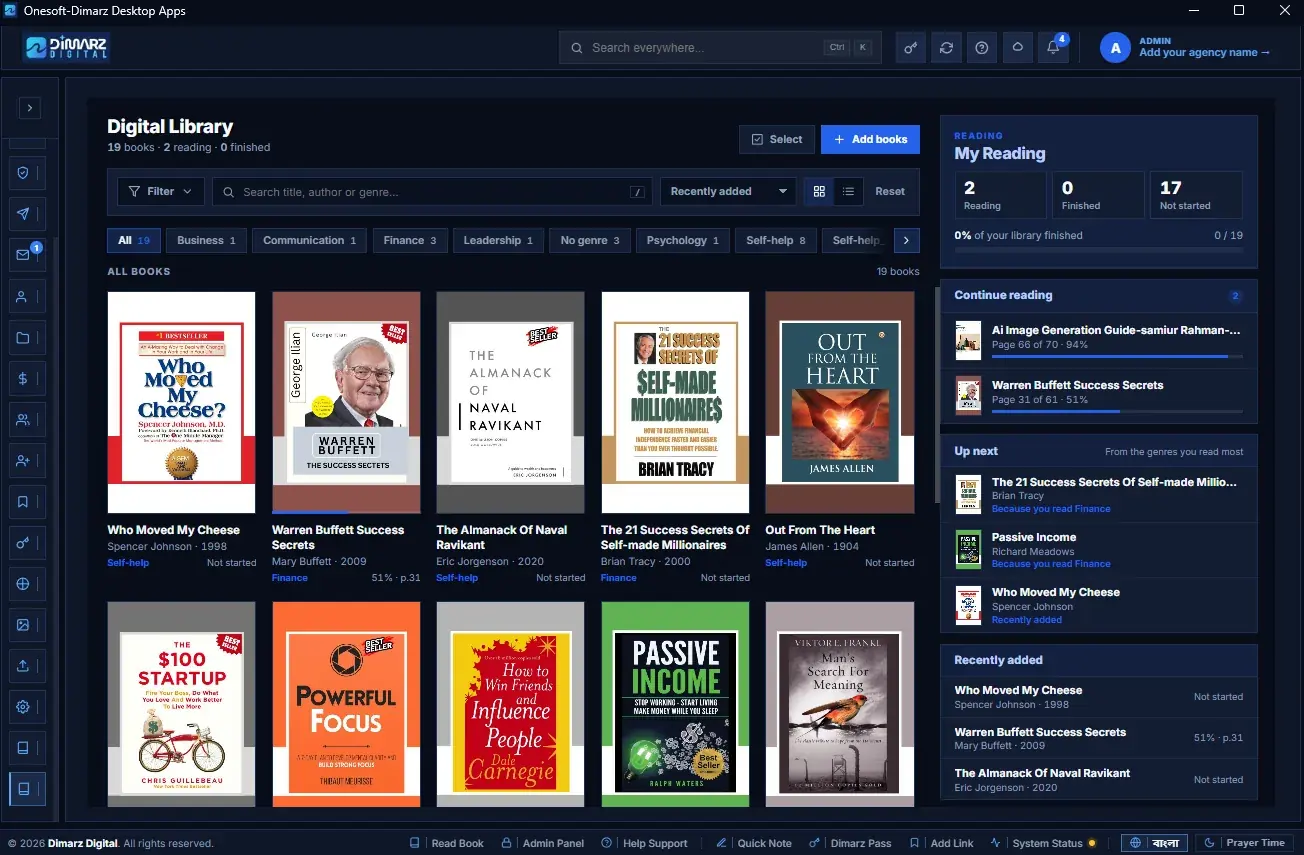
Digital LibraryReal screenshot
Digital Library 05 / 07
Your books, inside your workspace
Add books, search and filter by category, track what you are reading and continue where you stopped.
Reading progress
Categories
Continue reading
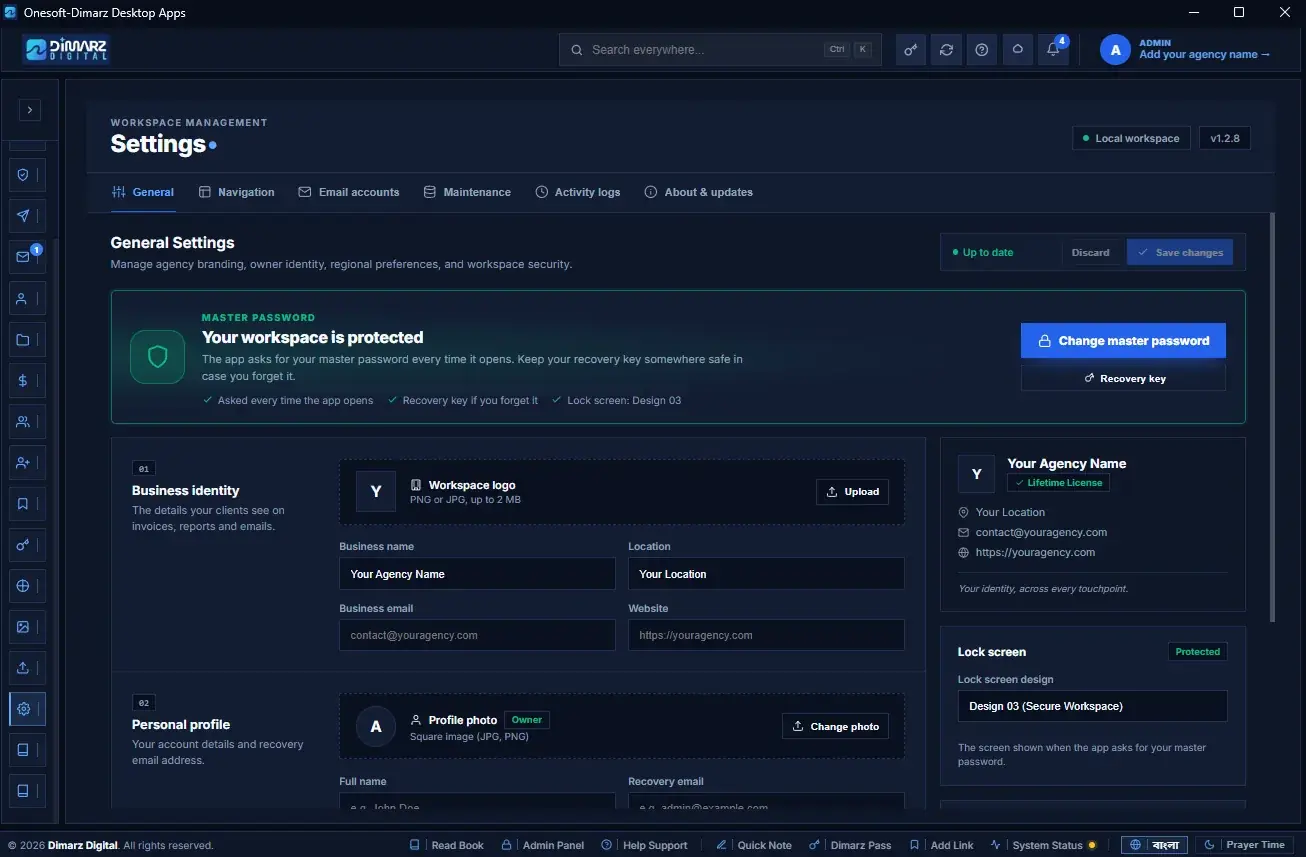
Settings · GeneralReal screenshot
Settings · General 06 / 07
Your brand and your security
Agency name, logo and contact details, your profile, regional preferences — and a master password that locks the workspace.
Agency branding
Master password
Lock screen
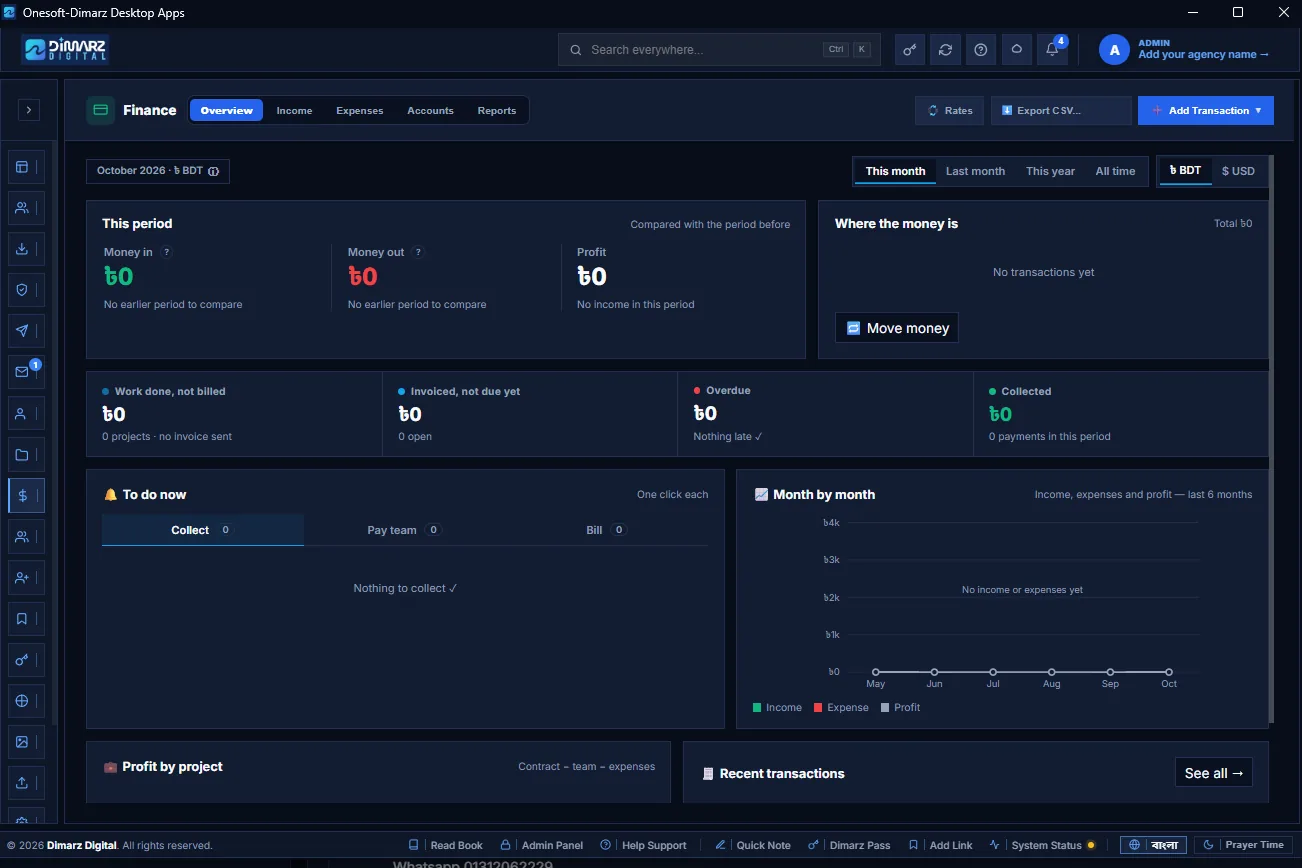
Finance · OverviewReal screenshot
Finance · Overview 07 / 07
Money in, money out, profit
See any period in ৳ BDT or USD: work not yet billed, overdue invoices, what to collect or pay, and income month by month.
This month / year
To do now
Profit by project
From invoice to insight
Know what you earned.And what you kept.
Invoice in your client's currency. Keep your accounting, team pay and profit in ৳ BDT. Record actual bank amounts and keep exchange gain or loss in view.
Client advances, partial payments, receipts, payslips and financial reports stay connected to the work behind them.
One connected money flow Workflow illustration
USDEURGBP৳ BDT
Project value → Branded invoiceBill
Record payment → Automatic receiptCollect
Pay your team → PDF payslipPay
A clear view of profit.
Income, expenses and account balances.
Conceptual workflow · no sample financial results
A guided first day
Get startedin 10 minutes.
Six short steps make the app ready for real work. The Dashboard's Get started line shows how far you are.
Encrypted Local & Cloud BackupsEncrypted backups on your PC or your own Google Drive.
Custom Backup SchedulesChoose specific modules or everything. Schedule daily or weekly backups.
One-Click Data RestorationRestore your data from local or cloud backups.
Zero-Knowledge Active
AES-256 GCM
Your PC. Your workspace.
Local data · Encrypted backups
Storage100% On-PC
Cloud SyncYour G-Drive
Data Leak0% Server
You control where your backup lives.
E-mail, Google Drive backup, cloud lead import, licence and updates require internet. Online services such as Google Apps and Hiring also need a connection.
The practical details
A few questions. Clear answers.
About your workflows, data and everyday work.
Do I need internet to use the app?
No. Only e-mail, Google Drive backup, cloud lead import, licence and updates need it.
Can I lock the app with a password?
Yes. Set a master password; a recovery key and recovery e-mail code help if you forget it.
Can I bill clients in USD or other currencies?
Yes. Invoices show the client's currency, while your accounts, profit and team pay stay in ৳ BDT. Exchange gain or loss is recorded automatically.
What if a client pays before I send an invoice?
It is saved as a client advance and deducted from the next invoice automatically.
Can I use my own e-mail accounts?
Yes — add as many sender accounts as you want, each with its own daily limit and signature. Gmail uses an App password.
Does Lead Checker change my main leads database?
No. It works only on the sheet you upload.
Are my passwords sent to a server?
No. bdi4 Pass encrypts and decrypts everything on your computer.
Can I move my data to a new computer?
Yes. Back up to a USB drive or Google Drive, install the app on the new computer, and restore.
Can I export data for my accountant?
Yes — CSV exports and printable PDF reports for Profit & Loss and the Balance Sheet.
Your whole freelance business, ready from day one.